
Griselita
-
Posts
168 -
Joined
-
Last visited
Immigration Timeline & Photos


Griselita's Achievements






-
Got all the info, was my mistake, son helped me, thank you!
-
How do I know where to send it (the mail?) just the n400 alone or do I need to include the tax information that shows my income?
-
 Crazy Cat reacted to a post in a topic:
Need help for filling the N400 with reduced fee, I am no tgetting the reduced fee!
Crazy Cat reacted to a post in a topic:
Need help for filling the N400 with reduced fee, I am no tgetting the reduced fee!
-
is that only for the fee waiver or does apply for the reduce fare too?
-
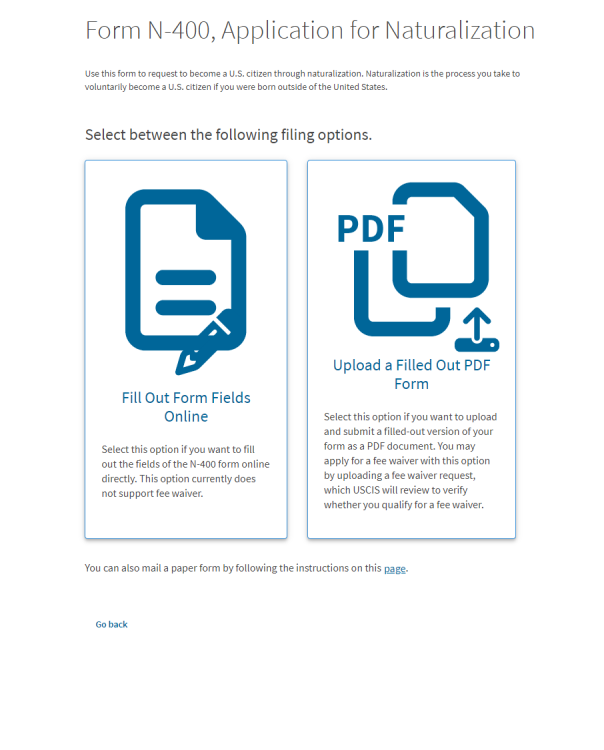
Which one? The one that says on the page itself that to qualify for the reduced rate, I have to upload a scanned document? Or the one on Google that tells me to send a physical document for the reduced rate? (From another USCIS link)
-
Oh ok. yes, I am aware of that but the confusion comes because the site says, that if you want to apply for reduction fee you have to do the paper one and then upload it, the full online one does not apply for reduction, but printing it, filling it then uploading it does. I don't have problem sending it by mail, i just want to know what happened there and if there any possibility to save some time doing it that way thy suggest.
-
What you mean?
-
Hi everyone, I'm working on my naturalization application (Form N-400). On the myUSCIS website, it gives two options: filling out the form completely online, or uploading a filled PDF. It also states clearly that if you're applying for a reduced fee, you cannot file online; you must upload a PDF. So, I followed those instructions: I downloaded the N-400 PDF, filled it out (including checking the box for the reduced fee in Part 10 and filling in the income fields), printed it, and then tried to upload it to my myUSCIS account. However, after uploading, the system still shows the full payment amount of $710. Curiously, the system seems to detect the legibility of the document and even recognizes my signature. But it doesn't seem to acknowledge where I checked the reduced fee box and filled in the corresponding fields in Part 10. What am I missing here? Why isn't the system recognizing my reduced fee request in the uploaded PDF? What should I do next? Any guidance would be greatly appreciated. Thanks!